The Problem
Every WordPress website costs $80-150+/month in hosting, plugins, security, and maintenance. At scale (50-300 sites), this is $48,000-540,000/year in recurring costs — most of which goes to keeping the WordPress engine running, not the website itself.
The Solution
Migrate static marketing websites to Cloudflare Pages. Hosting drops to $5/month total (Workers Paid covers the entire account, not per site). Performance improves. Security surface shrinks to near-zero. AI tools can manage content changes directly.
The Trade-off
You lose the WordPress visual editor (Divi, Elementor). You gain speed, security, cost savings, and AI-native workflows. Content editing is handled through 4 alternative workflows ranging from browser-based to AI-assisted.
Bottom Line
For brochure/marketing sites that don’t need e-commerce, user accounts, or complex dynamic features — Cloudflare Pages eliminates recurring hosting costs entirely while delivering better performance and security.
A typical medical practice, med spa, or small business WordPress site:
These figures represent typical WordPress deployments. Your actual costs may vary — for example, WP Engine hosting bundles backups, staging, and CDN, which reduces the plugin cost line items. However, the hosting base cost ($25-60/month) and plugin/maintenance overhead remain.
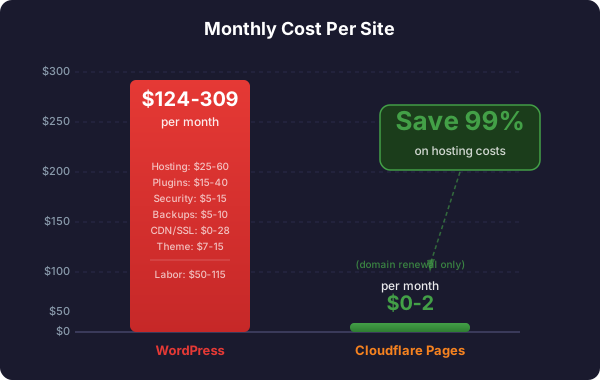
Cost Category Monthly Annual Notes Managed WordPress hosting $25-60 $300-720 SiteGround, WP Engine, Flywheel, etc. Domain registration $1-2 $12-20 Annual renewal SSL certificate $0-8 $0-100 Some hosts include free, some don’t Premium theme license $7-15 $89-180 Divi, Avada, etc. Premium plugins: - SEO (Yoast/RankMath Pro) $8-16 $99-199 - Security (Wordfence/Sucuri) $8-17 $99-199 - Backup (UpdraftPlus Pro) $6-8 $70-95 Included with WP Engine - Forms (Gravity Forms) $5-10 $59-119 - Performance (WP Rocket) $4-8 $49-99 - Other premium plugins (2-5) $10-30 $120-360 CDN (if separate) $0-20 $0-240 Already using Cloudflare O2O Subtotal: Tools & Hosting $74-194 $897-2,331 Maintenance labor: - WordPress core updates $10-25 $120-300 Monthly updates - Plugin updates (10-20 plugins) $15-30 $180-360 Testing after updates - Security monitoring $10-20 $120-240 Scan reviews, incident response - Backup verification $0-5 $0-60 Automated with WP Engine - Performance monitoring $5-15 $60-180 Page speed checks, caching - PHP/server maintenance $5-15 $60-180 Version updates, server config Subtotal: Labor $50-115 $600-1,380 At $25-50/hr developer rate TOTAL PER SITE $124-309 $1,497-3,711
$1,240-3,090 Monthly cost for 10 sites
$6,200-15,450 Monthly cost for 50 sites
$12,400-30,900 Monthly cost for 100 sites
$37,200-92,700 Monthly cost for 300 sites
Portfolio Size Monthly Cost (Low) Monthly Cost (High) Annual Cost (Low) Annual Cost (High) 10 sites $1,240 $3,090 $14,970 $37,110 50 sites $6,200 $15,450 $74,850 $185,550 100 sites $12,400 $30,900 $149,700 $371,100 300 sites $37,200 $92,700 $449,100 $1,113,300
Cost Category Monthly Annual Notes Cloudflare Pages hosting $0 $0 Free: unlimited sites, unlimited bandwidth Workers Paid plan $5/account $60/account Recommended. 5,000 builds/mo, 10M req/day, 100K files/deploy. Covers ALL sites.SSL certificate $0 $0 Automatic, included CDN $0 $0 Included, 300+ locations DDoS protection $0 $0 Included Serverless functions $0 $0 Included with Workers Paid Email delivery (SendGrid) $0 $0 Free tier: 100 emails/day Domain registration $1-2 $12-20 Same as WordPress TOTAL (portfolio-wide) $5 + $1-2/site $60 + $12-20/site $5/mo covers the entire account
WordPress
$124-309
per site/month
Cloudflare Pages
$5/mo total
per account (covers all sites)
Key pricing detail: The Workers Paid plan ($5/month) is per Cloudflare account, not per site . One $5/month subscription covers all 300 sites with 5,000 builds/month, 10M function requests/day, and 100K files per deployment. Per-site hosting is genuinely $0.
If you already use Cloudflare for DNS (O2O setup), you already have CDN, DDoS protection, and SSL. Migrating to Pages eliminates the WordPress origin server entirely — no more PHP, database, or plugin attack surface.
Item Cost Notes Developer time (migration) $500-2,000 10-40 hours depending on complexity Testing & QA $200-500 4-10 hours DNS cutover $100-200 2-4 hours Total per site $800-2,700 One-time
$1,497-3,711 WordPress annual cost
$800-2,700 Migration cost (one-time)
$72-80 Cloudflare annual cost
3-8 months Payback period
Year 1 savings: $0-2,839 (after migration cost)Year 2+ savings: $1,417-3,631/year (pure savings) $449K-1.1M WordPress annual cost
$120K-405K Migration cost (one-time, batch)
$3,660-6,060 Cloudflare annual cost (domains + $60 Workers Paid)
3-5 months Payback period
Year 2+ savings: $443,040-1,107,240/year
No more monthly/annual payments for:
Hosting plans
Eliminated
Plugin licenses
Eliminated
Security subscriptions
Eliminated
Backup services
Eliminated
CDN services
Eliminated
SSL certificates
Eliminated
Performance tools
Eliminated
Metric Typical WordPress Cloudflare Pages Improvement Time to First Byte (TTFB) 400-1200ms 20-80ms 5-60x faster Page Load (LCP) 2.5-8.0s 0.5-2.0s 2-4x faster Lighthouse Mobile 40-70/100 80-95/100 +20-50 points Global availability 1-3 server locations 300+ edge locations 100x more
Attack Vector WordPress Cloudflare Pages PHP vulnerabilities Exposed None (no PHP) Database injection (SQL) Exposed None (no database) Plugin vulnerabilities Exposed (20+ plugins) None (no plugins) Brute force login Exposed (wp-login.php) None (no login) File upload exploits Exposed (media library) None (no uploads) XML-RPC attacks Exposed None REST API leaks Exposed None Active attack surface Large Near zero
This is the strategic advantage that compounds over time:
AI can’t easily modify Divi layouts, shortcodes, or plugin configurations. The WordPress database stores content in serialized formats that are fragile to edit programmatically.
AI tools (Claude Code, Codex, Gemini) can directly:
Read and understand the HTML/CSS
Make content changes
Add new pages
Update styling
Deploy changes
Run tests
Check for WordPress core updates
Check for plugin updates (10-20 plugins)
Backup before updating
Update plugins one by one
Test site after each update
Check for broken functionality
Update PHP version if needed
Review security logs
Clear/rebuild cache
Verify backups completed
Check analytics for anomalies
Done.
Impact: High for teams that rely on drag-and-drop editing.
Open Divi Builder
Click on text, change it
Drag elements around
Hit publish (2 minutes)
Method Skill Level Time Best For Browser editing (GitHub.com or Cloudflare Dashboard)Basic 5-10 min Quick text changes Astro + CMS panel (Decap/Tina)Non-technical 5-10 min Regular content updates AI-assisted (Claude Code, etc.)Tell AI what to change 2-5 min Any change, any scale Local development (Git + code editor)Developer 15-30 min Major redesigns
Key insight: The AI-assisted workflow is actually faster than Divi for most changes. “Change the phone number on the homepage” takes 2 minutes with AI vs. 2 minutes with Divi — but the AI approach scales to 300 sites.
See the Content Editing Workflows page for detailed walkthroughs of each method.
Impact: Medium — Most plugins solve problems that don’t exist on static sites.
Plugin Category WordPress Plugin Cloudflare Alternative Migration Effort Forms Contact Form 7, Gravity Forms Cloudflare Functions + SendGrid Medium SEO Yoast, RankMath Static meta tags (built at deploy) Low Security Wordfence, Sucuri Not needed (no attack surface) None Caching WP Rocket, W3TC Not needed (already static + CDN) None Backup UpdraftPlus Git (built-in version control) None Image optimization ShortPixel, Imagify Build-time WebP conversion Low Search WP Search Pagefind (client-side) Low Analytics MonsterInsights Direct GA/GTM script Low Booking Calendly plugin Embed Calendly directly Low Cookie consent CookieYes, etc. Embed script directly Low
Plugins you no longer pay for: Security, caching, backup, performance, CDN, SSL.
Plugins replaced with free alternatives: Forms, SEO, search, analytics.
See Plugin Replacements for detailed replacement strategies.
Impact: Low for most marketing/brochure sites.
Content pulled from database on every request
User-specific content (logged-in state)
Real-time form processing
Search results
Comment threads
Static content that changes weekly/monthly at most
1-2 contact forms
A phone number and address
Business hours
Service descriptions
Impact: Medium initially, decreasing over time.
The transition curve:
Timeframe Experience Week 1 Unfamiliar, slower than WordPress Week 2-3 Comfortable with browser/CMS editing Month 2 Proficient, comparable speed to WordPress Month 3+ Faster than WordPress (especially with AI)
Approach WordPress/Divi CF Pages (HTML) CF Pages (Astro) Simple 5-page site 1-2 days 0.5-1 day 0.5-1 day 10-20 page site 3-5 days 2-3 days 1-2 days 50+ page site 1-2 weeks 1 week 3-5 days
Change WordPress/Divi CF Pages (Browser) CF Pages (AI) Change phone number 2 min 5 min 2 min Update hero image 5 min 10 min 3 min Add new page 15-30 min 30-60 min 10-15 min Redesign section 1-2 hours 1-2 hours 30-60 min Add new form 15 min (plugin) 30-60 min 15-30 min
Site Complexity Estimated Time Includes Simple (5-10 pages, 1 form) 8-16 hours Crawl, optimize, forms, test, deploy Medium (20-50 pages, 2-3 forms) 16-32 hours + plugin replacements, visual QA Complex (50+ pages, custom features) 32-80 hours + custom function development
Role WordPress Skills Cloudflare Pages Skills Learning Curve Content editor WordPress admin, Divi builder Browser editing, CMS panel, or AI tools 1-2 weeks Designer Divi/Elementor, WordPress themes HTML/CSS, Astro templates 2-4 weeks Developer PHP, WordPress hooks, plugin dev HTML/CSS/JS, Node.js, Wrangler CLI 1-2 weeks DevOps cPanel, PHP config, MySQL, server admin Wrangler CLI, Cloudflare Dashboard 1 week
Skill Who Needs It Difficulty Training Time Basic HTML editing Content editors Easy 2-4 hours Git basics (commit, push) Developers Easy 1-2 days Wrangler CLI Developers Easy 1-2 hours Cloudflare Dashboard Everyone Easy 1-2 hours Astro framework Developers Medium 1-2 weeks Cloudflare Functions Developers Medium 1 week AI-assisted editing Everyone Easy 1-2 hours
Skill Why Not Needed PHP development No PHP on static sites MySQL administration No database WordPress plugin management No plugins Server administration (cPanel, etc.) No server WordPress security hardening No WordPress WordPress performance tuning Already optimized by design
Item Cost Notes Migration development $500-2,700/site One-time, can be batched Team training $500-2,000 One-time for the team Tooling setup $0 All tools are free
Item Cost When Needed Workers Paid plan $5/month (per account) Recommended for any portfolio. Covers all sites: 5,000 builds/month, 10M requests/day, 100K files/deployCloudflare Pro $20/month per domain Only for specific high-value domains needing image optimization (Polish/Mirage) or advanced WAF rulesets SendGrid paid plan $15-20/month If >100 emails/day across all sites Headless CMS (Contentful, etc.) $0-300/month If using external CMS (free tiers available) AI tools (Claude Pro, etc.) $20-200/month For AI-assisted editing at scale
Cloudflare announced a native Email Service (Oct 2025, private preview) that sends transactional emails directly from Workers with auto-configured SPF, DKIM, and DMARC. Once generally available, this could replace SendGrid entirely at no additional cost.
Item Monthly Savings Annual Savings WordPress hosting $25-60/site $300-720/site Plugin licenses $15-40/site $180-480/site Security services $5-15/site $60-180/site Backup services $5-10/site $60-120/site CDN services $0-20/site $0-240/site SSL certificates $0-8/site $0-100/site Performance plugins $4-8/site $49-99/site Maintenance labor $50-115/site $600-1,380/site TOTAL ELIMINATED $104-276/site $1,249-3,319/site
Daily database backups
Daily file backups
Stored on separate server/cloud
Restoration: 30-60 minutes
Risk: Backup corruption, storage costs
WP Engine provides automated daily backups with one-click restore. However, backups still contain the full WordPress stack (database, plugins, themes, uploads) which adds restoration complexity compared to static deployments.
Every deployment is a backup (immutable, preserved forever)Git repository is the source of truth (full version history)Restoration: One click, instant rollback (< 1 minute)
Risk: Near zero (distributed across Cloudflare’s network + Git)
Feature WordPress Cloudflare Pages Backup method Scheduled copies Every deploy = backup Restore time 30-60 minutes < 1 minute Version history Limited Complete (Git) Storage cost $5-10/month $0 (included)Backup testing Manual Automatic (every deploy is testable)
Risk Probability Impact Mitigation SEO ranking drop during migration Low Medium 301 redirects, preserve URLs, monitor Forms stop working Medium High Test thoroughly on staging first Missing content/pages Low Medium Automated crawling + manual QA Team resistance to change Medium Medium Training, gradual rollout, show benefits Client confusion Low Low Transparent communication, documentation
Risk Probability Impact Mitigation Cloudflare service outage Very Low High 99.99% uptime SLA. When Cloudflare is down, most of the internet is affected. Free tier limits exceeded Very Low Low Workers Paid ($5/mo per account) covers all realistic needs SendGrid email deliverability Low Medium Monitor, backup email service AI tool dependency Low Low Manual editing always available
Risk Probability Impact Mitigation Plugin vulnerability exploit Medium-High Critical Constant updates, monitoring, WAF WordPress core vulnerability Medium Critical Immediate patching required Server compromise Medium Critical Security hardening, monitoring Host outage Low-Medium High Redundancy, CDN Database corruption Low Critical Backups, testing PHP version incompatibility Medium Medium Testing before upgrade
Phase 1: Pilot (Month 1)
Migrate 2-3 simple sites (5-10 pages, 1 form)
Document process and pain points
Measure performance improvement
Calculate actual cost savings
Train 1-2 team members
Phase 2: Batch Migration (Months 2-4)
Migrate next 10-20 sites (simplest first)
Establish standard migration process
Build reusable templates and scripts
Train remaining team on content editing
Phase 3: Scale (Months 4-12)
Migrate remaining portfolio in batches
Introduce Astro for new site builds
Implement AI-assisted management workflows
Cancel WordPress hosting as sites are migrated
Phase 4: New Builds (Ongoing)
All new sites built on Astro + Cloudflare Pages
AI-first content management
No new WordPress installations
Site is primarily static content (brochure/marketing)
Site has < 5 forms
Site doesn’t require user accounts/login
Site doesn’t need e-commerce (WooCommerce)
Performance/page speed is a concern
Cost reduction is a priority
Security is a concern
Site requires e-commerce (WooCommerce store)
Site has complex membership/login features
Site uses WordPress-specific integrations that can’t be replicated
Site is updated multiple times per day by non-technical staff
The client specifically requires WordPress admin access
Sites with booking systems (often can embed third-party)
Sites with blogs updated weekly (Astro handles this well)
Sites with simple search (Pagefind works client-side)
Sites with multi-language (can be handled statically)
WordPress
$100-300
per site/month. Constant maintenance. Security risk. Slow performance. Doesn’t scale with AI.
Cloudflare Pages
$5/mo
total (per account). Zero maintenance. No security surface. Fastest performance. AI-native.
Trade-off: Lose the visual page builder. Gain everything else.
$443K-1.1M Potential annual savings (300 sites)
3-8 months Payback period
3 sites Recommended pilot size