Leadership & Project Managers
- Start with: Business Case — Cost analysis, what you gain/lose
- Then read: Decision Guide — Which sites are good candidates
- Reference: Project Management — Timelines, checklists, handoff
A comprehensive, multi-audience guide for building and deploying websites on Cloudflare Pages — whether migrating from WordPress or building from scratch.
Leadership & Project Managers
Designers
Developers
Everyone
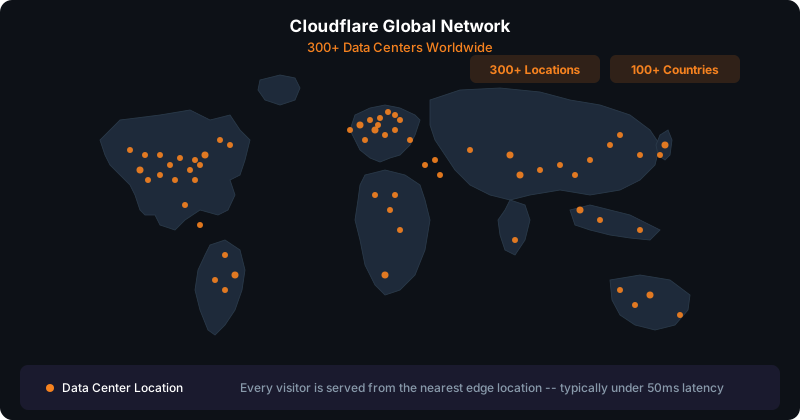
Cloudflare Pages is a static site hosting platform built into Cloudflare’s global network (300+ edge locations worldwide). It serves pre-built HTML, CSS, and JavaScript files directly from the CDN edge — no server, no PHP, no database.
| Feature | Description |
|---|---|
| Static hosting | Pre-built HTML/CSS/JS served from CDN |
| Serverless functions | Backend logic via Cloudflare Functions (Workers) |
| Global CDN | 300+ edge locations, automatic |
| Free SSL | Automatic HTTPS certificates |
| Free tier | 500 builds/month, unlimited bandwidth, 20K files/deploy |
| Workers Paid ($5/mo) | 5,000 builds/month, 10M requests/day, 100K files/deploy (per account, not per site) |
| Custom domains | Connect any domain |
| Git integration | Auto-deploy from GitHub/GitLab |
| Instant rollback | Every deployment preserved, one-click rollback |
| Astro (first-party) | Cloudflare acquired Astro in Jan 2026 |

graph LR
  A[User Request] --> B[Web Server]
  B --> C[PHP Engine]
  C --> D[MySQL Database]
  D --> C
  C --> E[Generate HTML]
  E --> F[Send Response]
Every page load runs PHP code, queries a database, and generates HTML on the fly. This requires a server running 24/7.
graph LR
  A[User Request] --> B[CDN Edge - Nearest Location]
  B --> C[Return Pre-Built HTML]
Pages are built once at deploy time. Every request is served from the nearest edge location as static files. No server, no database, no PHP.
In January 2026, Cloudflare acquired The Astro Technology Company. Astro is now Cloudflare’s first-party web framework — the recommended way to build content-driven websites on Cloudflare Pages.
What Astro Brings
The Analogy
Think of it as: WordPress is to WordPress.com as Astro is to Cloudflare Pages.
Astro is the framework. Cloudflare Pages is the hosting platform. Together they form a complete, modern web publishing stack.
| Cost Item | Monthly | Annual |
|---|---|---|
| Hosting (managed WP) | $20-50 | $240-600 |
| Premium theme (Divi) | $7-15 | $89-180 |
| Premium plugins (5-10) | $15-40 | $180-480 |
| Security plugin/service | $5-15 | $60-180 |
| Backup service | $5-10 | $60-120 |
| SSL certificate | $0-10 | $0-120 |
| CDN (if separate) | $0-20 | $0-240 |
| Subtotal (tools) | $52-160 | $629-1,920 |
| Maintenance time (2-4 hrs/mo) | $50-200 | $600-2,400 |
| Total per site | $100-360 | $1,200-4,320 |
| Cost Item | Monthly | Annual |
|---|---|---|
| Hosting | Free | Free |
| SSL certificate | Free | Free |
| CDN | Free | Free |
| DDoS protection | Free | Free |
| Functions (forms) | Free | Free |
| Email (SendGrid free) | Free | Free |
| Workers Paid plan | $5/account | $60/account |
| Total per site | ~$0 | ~$0 |
| Benefit | Impact |
|---|---|
| Near-zero hosting cost | $5/month total (Workers Paid covers entire account) |
| Superior performance | Static files from 300+ edge locations |
| Built-in security | No PHP/MySQL attack surface, automatic DDoS protection |
| No plugin management | No updates, no vulnerabilities, no conflicts |
| No server maintenance | No PHP versions, no MySQL tuning, no server patches |
| AI-compatible | Static HTML/Astro can be directly edited by AI tools |
| Instant rollback | Every deployment preserved, one-click revert |
| Global scale | Handles traffic spikes without upgrading hosting |
| 99.99%+ uptime | Cloudflare’s infrastructure |
| Loss | Impact | Mitigation |
|---|---|---|
| Visual page builder | No Divi/Elementor drag-and-drop | Astro CMS, AI-assisted editing |
| WordPress admin | No wp-admin dashboard | Cloudflare Dashboard, GitHub, CMS panels |
| Plugin ecosystem | No one-click plugin installs | Cloudflare Functions, third-party APIs |
| Dynamic content | No PHP-generated pages | Pre-build at deploy time, Functions for dynamic needs |
| Database | No MySQL queries | Static content, external APIs if needed |
| User accounts/login | No native authentication | Cloudflare Access, Auth0, third-party |
| Built-in forms | No Contact Form 7 / Gravity Forms | Cloudflare Functions + SendGrid |
| Search | No WordPress search | Pagefind, Algolia, Fuse.js |
| E-commerce | No WooCommerce | Shopify embed, Snipcart, Stripe |
| Comments | No native comments | Disqus, Giscus, or remove |
Marketing / Brochure Sites
Practice websites, “about us” pages
Landing Pages
PPC campaigns, conversion pages
Portfolio Sites
Showcase work, case studies
Documentation
Guides, manuals, knowledge bases
Blogs
Content-focused sites (Astro excels here)
Small Business Sites
5-50 pages, mostly static content
Performance-Critical Sites
Core Web Vitals, SEO ranking focused
E-commerce Stores
Sites with carts, checkout, inventory (use Shopify)
Membership Sites
Login-required content, user dashboards
Web Applications
Complex interactivity, real-time data
Forums / Communities
User-generated content platforms
High-Frequency Publishing
News sites with constant publishing
WordPress-Plugin-Dependent
Booking systems, LMS, etc.
An honest assessment of what locks you into Cloudflare and how hard it is to leave.
| Component | Lock-In Risk | Notes |
|---|---|---|
| DNS on Cloudflare | Low | Moving DNS requires updating nameservers at registrar + TTL propagation (hours to days) |
| Pages Functions | Medium | Written for Workers runtime, not standard Node.js. Would need rewrite for Vercel/Netlify |
| R2 storage | Low | S3-compatible API, data is portable |
| KV/D1 | High | Proprietary APIs, locked in if used |
| Static HTML/CSS/JS | None | Runs anywhere — Netlify, Vercel, S3, any web server |
| Astro sites | None | Framework-agnostic, adapters for all platforms |
| Site Type | Exit Difficulty | What’s Involved |
|---|---|---|
| Static HTML sites | Easy | Copy files to any host |
| Astro sites | Easy | Change adapter, deploy elsewhere |
| Sites with form Functions | Medium | Rewrite 1 serverless function per site |
| Sites using KV/D1/Durable Objects | Hard | Rewrite data layer entirely |
| # | Document | Audience | Purpose |
|---|---|---|---|
| 00 | Overview (this page) | Everyone | Overview and orientation |
| 01 | Business Case | Leadership, PMs | Business case, costs, ROI |
| 02 | Decision Guide | PMs, Leadership | Which sites to migrate, scoring |
| 03 | Prerequisites | Developers | Tools, accounts, setup |
| 04 | WordPress Migration | Developers | WordPress to Cloudflare process |
| 05 | Fresh Build | Developers, Designers | Building from scratch |
| 06 | Content Editing | Everyone | 4 ways to make changes |
| 07 | Plugin Replacements | Developers, PMs | WordPress plugin alternatives |
| 08 | Optimization | Developers, Designers | Performance tuning |
| 09 | Deployment | Developers | Deploy, domains, DNS |
| 10 | Testing & Validation | Developers, QA | Testing and quality |
| 11 | Troubleshooting | Developers | Common issues and fixes |
| 12 | Project Management | PMs, Leadership | Checklists, timelines |
| 13 | Maintenance | Everyone | Post-launch operations |
npm run deploy