Auto Minify
Removes whitespace, comments, and unnecessary characters from CSS, JS, and HTML.
Plan: Free | Risk: Low | Impact: 5-15% smaller files
Enable: Speed > Optimization > Content Optimization > Auto Minify
Every 100ms of load time improvement increases conversion rates by 1-2%. For medical practice websites, a slow site means lost patient appointments. Google also uses Core Web Vitals as a ranking signal — faster sites rank higher.
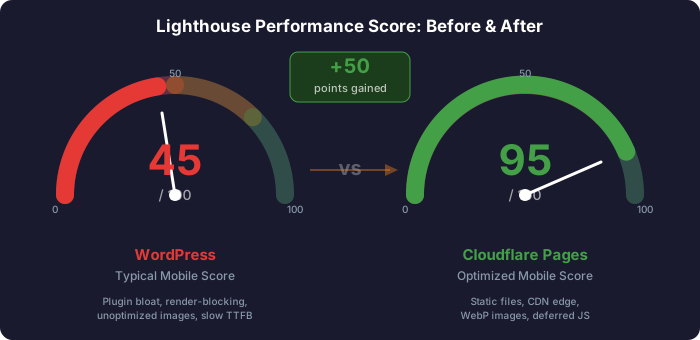
WordPress reality: Most WordPress sites score 30-60 on Lighthouse mobile. Plugin bloat, render-blocking CSS, unoptimized images, and database queries drag performance down.
Cloudflare Pages target: 90+ mobile, 95+ desktop. No server-side rendering, no database, no PHP overhead. Just static files served from 300+ edge locations.
Core Web Vitals are Google’s metrics for measuring real-world user experience. They directly affect search rankings.
| Metric | What It Measures | Good | Needs Work | Poor |
|---|---|---|---|---|
| LCP (Largest Contentful Paint) | How fast the main content loads | < 2.5s | 2.5-4.0s | > 4.0s |
| INP (Interaction to Next Paint) | How fast the page responds to clicks/taps | < 200ms | 200-500ms | > 500ms |
| CLS (Cumulative Layout Shift) | How much the page layout jumps around | < 0.1 | 0.1-0.25 | > 0.25 |
What triggers LCP: The largest image, video, or text block visible in the viewport when the page first loads. For medical practice sites, this is typically the hero image or hero heading.
| Problem | Fix | Impact |
|---|---|---|
| Large hero image (2MB+ JPEG) | Convert to WebP, resize to viewport width | High -1.5s to -3s |
| Render-blocking CSS | Inline critical CSS, defer the rest | High -0.5s to -1s |
| Render-blocking JS | Defer/async all scripts | High -0.5s to -1.5s |
| Slow server response (TTFB) | Already solved — CDN edge serving | High -0.5s to -2s |
| Web font blocking render | font-display: swap, preload | Medium -0.3s to -0.5s |
| Lazy-loading the LCP image | Remove loading="lazy" from hero image | Medium -0.5s to -1s |
| Problem | Fix | Impact |
|---|---|---|
| Heavy JavaScript on main thread | Code-split, defer non-critical JS | High -100ms to -300ms |
| Large DOM (3000+ elements) | Simplify markup | Medium -50ms to -150ms |
| Third-party scripts (chat, analytics) | Delay until user interaction | High -100ms to -500ms |
| Long-running event handlers | Break into smaller tasks | Medium -50ms to -200ms |
| Problem | Fix | Impact |
|---|---|---|
| Images without width/height | Always set width and height attributes | High -0.1 to -0.3 |
| Web fonts causing text reflow | font-display: swap + match fallback metrics | Medium -0.05 to -0.15 |
| Ads/embeds without reserved space | Use aspect-ratio or fixed containers | High -0.1 to -0.5 |
| Content injected above the fold | Reserve space or load below fold | Medium -0.1 to -0.3 |
<!-- WRONG: No dimensions = layout shift when image loads --><img src="/images/doctor.webp" alt="Dr. Smith">
<!-- CORRECT: Explicit dimensions prevent layout shift --><img src="/images/doctor.webp" width="600" height="400" alt="Dr. Smith">
<!-- ALSO CORRECT: CSS aspect-ratio for responsive images --><img src="/images/doctor.webp" style="aspect-ratio: 3/2; width: 100%;" alt="Dr. Smith">| Tool | Type | URL |
|---|---|---|
| PageSpeed Insights | Lab + Field | https://pagespeed.web.dev/ |
| Lighthouse (Chrome DevTools) | Lab only | F12 > Lighthouse tab |
| Web Vitals Extension | Lab (real-time) | Chrome Web Store |
| Chrome UX Report (CrUX) | Field data (real users) | developer.chrome.com/docs/crux/ |
| Search Console | Field data | search.google.com > Core Web Vitals |
Cloudflare provides built-in performance features that require zero code changes. Enable them in the Cloudflare Dashboard.
Auto Minify
Removes whitespace, comments, and unnecessary characters from CSS, JS, and HTML.
Plan: Free | Risk: Low | Impact: 5-15% smaller files
Enable: Speed > Optimization > Content Optimization > Auto Minify
Brotli Compression
15-25% better compression than gzip for text-based assets.
Plan: Free | Risk: None | Impact: Significant for HTML/CSS/JS
Enable: Speed > Optimization > Content Optimization > Brotli
Rocket Loader
Defers loading of all JavaScript until after page renders.
Plan: Free | Risk: Medium | Impact: 0.5-1.5s LCP improvement
Test thoroughly — can break forms and interactive elements.
HTTP/3 and QUIC
UDP-based transport for faster connections, especially on mobile.
Plan: Free | Risk: None | Impact: 10-30% faster mobile
Enable: Network > HTTP/3 (with QUIC)
Early Hints (103)
Sends preload hints before the full response, so browsers start downloading CSS/fonts early.
Plan: Free | Risk: None | Impact: 0.1-0.5s LCP improvement
Enable: Speed > Optimization > Content Optimization > Early Hints
Polish (Image Optimization)
Automatically compresses and converts images to WebP/AVIF.
Plan: Pro ($20/mo) | Risk: None | Impact: 30-70% smaller images
For free tier, use build-time optimization instead.
# Enable Auto Minifycurl -X PATCH "https://api.cloudflare.com/client/v4/zones/{zone_id}/settings/minify" \  -H "Authorization: Bearer {api_token}" \  -H "Content-Type: application/json" \  --data '{"value":{"css":"on","html":"on","js":"on"}}'
# Enable Brotlicurl -X PATCH "https://api.cloudflare.com/client/v4/zones/{zone_id}/settings/brotli" \  -H "Authorization: Bearer {api_token}" \  --data '{"value":"on"}'
# Enable HTTP/3curl -X PATCH "https://api.cloudflare.com/client/v4/zones/{zone_id}/settings/http3" \  -H "Authorization: Bearer {api_token}" \  --data '{"value":"on"}'
# Enable Early Hintscurl -X PATCH "https://api.cloudflare.com/client/v4/zones/{zone_id}/settings/early_hints" \ -H "Authorization: Bearer {api_token}" \ --data '{"value":"on"}'Images are typically 50-80% of a page’s total weight. Optimizing images is the single highest-impact performance improvement.
npm install sharp globimport sharp from 'sharp';import { glob } from 'glob';import path from 'path';import fs from 'fs';
const IMAGE_DIR = './public/images';const QUALITY = 80;const MAX_WIDTH = 1920;
async function optimizeImages() { const images = await glob(`${IMAGE_DIR}/**/*.{jpg,jpeg,png,gif}`, { nodir: true }); console.log(`Found ${images.length} images to optimize`);
for (const imagePath of images) { const ext = path.extname(imagePath); const webpPath = imagePath.replace(ext, '.webp');
if (fs.existsSync(webpPath)) { const srcStat = fs.statSync(imagePath); const webpStat = fs.statSync(webpPath); if (webpStat.mtimeMs > srcStat.mtimeMs) continue; }
try { const metadata = await sharp(imagePath).metadata(); let pipeline = sharp(imagePath); if (metadata.width > MAX_WIDTH) { pipeline = pipeline.resize(MAX_WIDTH, null, { withoutEnlargement: true, fit: 'inside' }); } await pipeline.webp({ quality: QUALITY }).toFile(webpPath);
const originalSize = fs.statSync(imagePath).size; const webpSize = fs.statSync(webpPath).size; const savings = ((1 - webpSize / originalSize) * 100).toFixed(1); console.log(` Done: ${path.basename(imagePath)} → .webp (${savings}% smaller)`); } catch (err) { console.error(` Error: ${path.basename(imagePath)} - ${err.message}`); } }}
optimizeImages();Serve different image sizes for different screen widths:
<picture> <source type="image/webp" srcset="/images/hero-480.webp 480w, /images/hero-768.webp 768w, /images/hero-1200.webp 1200w, /images/hero-1920.webp 1920w" sizes="100vw"> <img src="/images/hero-1200.jpg" srcset="/images/hero-480.jpg 480w, /images/hero-768.jpg 768w, /images/hero-1200.jpg 1200w, /images/hero-1920.jpg 1920w" sizes="100vw" width="1920" height="1080" alt="Modern medical practice lobby" fetchpriority="high"></picture><!-- Above the fold (hero): NO lazy loading, high priority --><img src="/images/hero.webp" width="1920" height="1080" alt="Hero image" fetchpriority="high">
<!-- Below the fold: Lazy load --><img src="/images/services.webp" width="600" height="400" alt="Our services" loading="lazy" decoding="async">
<!-- Far below the fold: Lazy load + low priority --><img src="/images/testimonials.webp" width="300" height="300" alt="Patient testimonial" loading="lazy" decoding="async" fetchpriority="low">---import { Image } from 'astro:assets';import heroImage from '../assets/images/hero.jpg';import doctorPhoto from '../assets/images/doctor.jpg';---
<!-- Auto: converts to WebP, generates srcset, sets dimensions --><Image src={heroImage} alt="Modern medical practice" widths={[480, 768, 1200, 1920]} sizes="100vw" loading="eager" fetchpriority="high" />
<!-- Below-fold: lazy loaded by default --><Image src={doctorPhoto} alt="Dr. Smith" widths={[300, 600]} sizes="(max-width: 768px) 100vw, 600px" />srcset and sizes for hero/large imagesfetchpriority="high" and no loading="lazy"loading="lazy" and decoding="async"width and height attributesInline the minimum CSS needed to render above-the-fold content in the <head>:
<head>  <!-- Critical CSS inlined -->  <style>    *, *::before, *::after { box-sizing: border-box; margin: 0; padding: 0; }    body { font-family: system-ui, -apple-system, sans-serif; line-height: 1.6; }    .header { background: #fff; padding: 1rem 0; border-bottom: 1px solid #e5e7eb; }    .hero { padding: 4rem 0; background: #f8fafc; }    .hero h1 { font-size: 2.5rem; font-weight: 700; color: #1e293b; }  </style>
<!-- Full stylesheet loaded asynchronously --> <link rel="preload" href="/css/style.css" as="style" onload="this.onload=null;this.rel='stylesheet'"> <noscript><link rel="stylesheet" href="/css/style.css"></noscript></head>npm install criticalimport { generate } from 'critical';
await generate({ base: './public/', src: 'index.html', target: { html: 'index.html', css: 'css/critical.css' }, width: 1300, height: 900, inline: true});npm install purgecssimport { PurgeCSS } from 'purgecss';import fs from 'fs';
const result = await new PurgeCSS().purge({ content: ['./public/**/*.html'], css: ['./public/css/**/*.css'], safelist: { standard: ['active', 'open', 'visible', 'is-scrolled'], deep: [/^modal/, /^dropdown/], greedy: [/^wp-/] }});
for (const { file, css } of result) { fs.writeFileSync(file, css);}Typical results:
| File | Before | After PurgeCSS | Reduction |
|---|---|---|---|
| style.css (Divi theme) | 380KB | 45KB | 88% |
| style.css (Bootstrap) | 230KB | 28KB | 88% |
| style.css (custom theme) | 85KB | 22KB | 74% |
<head>@import in CSS files (use <link> tags instead)<!-- BLOCKING (default) - Pauses HTML parsing --><script src="/js/app.js"></script>
<!-- DEFER - Downloads in parallel, executes after HTML parsed --><script defer src="/js/app.js"></script>
<!-- ASYNC - Downloads in parallel, executes immediately when ready --><script async src="/js/analytics.js"></script>| Attribute | Downloads | Executes | Order | Best For |
|---|---|---|---|---|
| (none) | Blocks parsing | Immediately | Yes | Almost never — avoid |
defer | In parallel | After HTML parsed | Yes | Most scripts |
async | In parallel | When ready | No | Independent scripts (analytics) |
<script>const DELAYED_SCRIPTS = [  'https://www.googletagmanager.com/gtag/js?id=G-XXXXXXXXXX',  'https://widget.intercom.io/widget/xxxxx',];
let loaded = false;function loadDelayedScripts() {  if (loaded) return;  loaded = true;  DELAYED_SCRIPTS.forEach(src => {    const script = document.createElement('script');    script.src = src;    script.async = true;    document.body.appendChild(script);  });}
// Load on first user interaction['mouseover', 'touchstart', 'scroll', 'keydown'].forEach(event => {  document.addEventListener(event, loadDelayedScripts, { once: true });});
// Fallback: load after 5 secondssetTimeout(loadDelayedScripts, 5000);</script>| Script | Size | Needed? |
|---|---|---|
| jquery.min.js | 87KB | Rarely — rewrite in vanilla JS |
| jquery-migrate.min.js | 10KB | Never — WordPress compatibility shim |
| wp-embed.min.js | 2KB | Never — WordPress oEmbed |
| wp-emoji-release.min.js | 14KB | Never — WordPress emoji polyfill |
| Divi/Elementor builder JS | 200-500KB | Never in production |
defer or async@font-face { font-family: 'Inter'; src: url('/fonts/inter-var.woff2') format('woff2'); font-weight: 100 900; font-display: swap; /* Show fallback font immediately, swap when loaded */}| Value | Behavior | CLS Risk | Recommendation |
|---|---|---|---|
auto | Browser decides | High | Avoid |
block | Invisible text for up to 3s | High | Avoid |
swap | Fallback shown immediately | Medium | Use this |
fallback | Brief invisible (100ms), then fallback | Low | Good alternative |
optional | May skip custom font if slow | None | Best for performance |
Google Fonts adds an external DNS lookup and request chain. Self-hosting eliminates this latency.
Download fonts from google-webfonts-helper or directly from Google Fonts
Create @font-face declarations:
@font-face { font-family: 'Inter'; font-style: normal; font-weight: 100 900; font-display: swap; src: url('/fonts/inter-var.woff2') format('woff2');}Remove Google Fonts links and replace with self-hosted:
<!-- REMOVE --><link href="https://fonts.googleapis.com/css2?family=Inter" rel="stylesheet">
<!-- REPLACE --><link rel="stylesheet" href="/css/fonts.css">
Preload critical fonts:
<link rel="preload" href="/fonts/inter-var.woff2" as="font" type="font/woff2" crossorigin>| Technique | Savings | How |
|---|---|---|
| Use WOFF2 only | 30% vs WOFF | Drop WOFF/TTF/EOT formats |
| Variable fonts | 40-60% | One file instead of multiple weights |
| Subset fonts | 50-80% | Include only Latin characters |
| Limit weights | 30-60% | Use 2-3 weights max |
font-display: swap<head># HTML pages - short cache, always revalidate/*.html Cache-Control: public, max-age=3600, must-revalidate
/ Cache-Control: public, max-age=3600, must-revalidate
# CSS/JS - long cache with content hash in filename/css/* Cache-Control: public, max-age=31536000, immutable
/js/* Cache-Control: public, max-age=31536000, immutable
# Images and fonts - long cache/images/* Cache-Control: public, max-age=31536000, immutable
/fonts/* Cache-Control: public, max-age=31536000, immutable Access-Control-Allow-Origin: *
# Other files/favicon.ico Cache-Control: public, max-age=86400
/sitemap.xml Cache-Control: public, max-age=86400
/robots.txt Cache-Control: public, max-age=86400| Directive | Meaning | Example Use |
|---|---|---|
public | Can be cached by CDN and browser | All assets |
max-age=N | Cache for N seconds | 3600 = 1 hour, 31536000 = 1 year |
immutable | Never changes, skip revalidation | Hashed filenames |
must-revalidate | Check with server when cache expires | HTML pages |
no-cache | Always revalidate before using cached copy | Dynamic content |
stale-while-revalidate=N | Serve stale while fetching fresh in background | Balance freshness/speed |
flowchart TD
    A[Browser Cache - user's device] -->|if expired| B[Cloudflare Edge Cache - nearest POP]
    B -->|if expired| C[Cloudflare Pages Origin - build output]
Key behaviors:
Cache-Control headers from _headersimmutable tells both browser and CDN to never revalidate<!-- Filename includes content hash - changes when file changes --><link rel="stylesheet" href="/css/style.a1b2c3d4.css"><script defer src="/js/app.e5f6g7h8.js"></script><!-- Query string changes force cache invalidation --><link rel="stylesheet" href="/css/style.css?v=2.1"><script defer src="/js/app.js?v=2.1"></script>Some CDNs and proxies ignore query strings for caching, so content hashing is preferred.
_headers File# Global headers/* X-Frame-Options: SAMEORIGIN X-Content-Type-Options: nosniff Referrer-Policy: strict-origin-when-cross-origin Permissions-Policy: camera=(), microphone=(), geolocation=(), payment=() Strict-Transport-Security: max-age=31536000; includeSubDomains; preload X-XSS-Protection: 1; mode=block Content-Security-Policy: default-src 'self'; script-src 'self' 'unsafe-inline' https://www.googletagmanager.com https://www.google-analytics.com; style-src 'self' 'unsafe-inline'; img-src 'self' data: https:; font-src 'self'; connect-src 'self' https://www.google-analytics.com; frame-src 'self' https://www.youtube.com https://www.google.com; base-uri 'self'; form-action 'self'
# HTML pages/*.html Cache-Control: public, max-age=3600, must-revalidate
/ Cache-Control: public, max-age=3600, must-revalidate
# Static assets/css/* Cache-Control: public, max-age=31536000, immutable
/js/* Cache-Control: public, max-age=31536000, immutable
/images/* Cache-Control: public, max-age=31536000, immutable
/fonts/* Cache-Control: public, max-age=31536000, immutable Access-Control-Allow-Origin: *
/favicon.ico Cache-Control: public, max-age=86400
/sitemap.xml Cache-Control: public, max-age=86400
/robots.txt Cache-Control: public, max-age=86400| Header | Value | Purpose |
|---|---|---|
X-Frame-Options | SAMEORIGIN | Prevents clickjacking (iframe embedding) |
X-Content-Type-Options | nosniff | Prevents MIME-sniffing |
Referrer-Policy | strict-origin-when-cross-origin | Controls referrer info sharing |
Permissions-Policy | camera=(), ... | Disables unused browser features |
Strict-Transport-Security | max-age=31536000; includeSubDomains; preload | Forces HTTPS for 1 year |
Content-Security-Policy | See below | Declares allowed resource sources |
Content-Security-Policy: default-src 'self'; # Default: only same-origin script-src 'self' 'unsafe-inline' # Scripts: self + inline https://www.googletagmanager.com # + GTM https://www.google-analytics.com; # + GA style-src 'self' 'unsafe-inline'; # Styles: self + inline img-src 'self' data: https:; # Images: self + data URIs + HTTPS font-src 'self'; # Fonts: self only connect-src 'self' # XHR/Fetch: self + GA https://www.google-analytics.com; frame-src 'self' # Iframes: self + embeds https://www.youtube.com https://www.google.com; base-uri 'self'; # Restrict <base> tag form-action 'self'; # Forms submit to self onlyTesting: Verify at https://securityheaders.com/ — target grade A or A+.
A step-by-step process to take a migrated site from a typical WordPress score (30-60) to the target (90+ mobile).
_headers file with cache and security headersdefer to all <script> tagsloading="lazy" to all below-fold imageswidth and height to all <img> tagsfetchpriority="high" on the hero/LCP image<head>font-display: swap to all @font-face| Metric | WordPress (Before) | Cloudflare Pages (After) | Change |
|---|---|---|---|
| Performance | 35-55 | 92-100 | +40 to +65 |
| Accessibility | 70-85 | 90-100 | +10 to +25 |
| Best Practices | 65-80 | 95-100 | +20 to +30 |
| SEO | 80-90 | 95-100 | +10 to +15 |
| Metric | WordPress (Before) | Cloudflare Pages (After) | Target |
|---|---|---|---|
| LCP | 4.5-8.0s | 0.8-2.0s | < 2.5s |
| INP | 150-400ms | 20-80ms | < 200ms |
| CLS | 0.15-0.45 | 0.0-0.05 | < 0.1 |
| TTFB | 800ms-2.5s | 20-80ms | < 800ms |
| Resource | WordPress (Before) | Cloudflare Pages (After) | Reduction |
|---|---|---|---|
| HTML | 80-150KB | 15-30KB | 70-80% |
| CSS | 300-600KB | 20-50KB | 85-92% |
| JavaScript | 500KB-1.5MB | 10-50KB | 90-97% |
| Images | 2-8MB | 200KB-1MB | 75-90% |
| Fonts | 200-500KB | 30-80KB | 75-85% |
| Total | 3-10MB | 300KB-1.2MB | 80-92% |
| Factor | WordPress | Cloudflare Pages |
|---|---|---|
| Server | Shared PHP server, 800ms+ TTFB | CDN edge, 20-80ms TTFB |
| CSS | Full theme + 10 plugin stylesheets | Purged, critical-inlined |
| JavaScript | jQuery + plugins + builder JS | Minimal vanilla JS, deferred |
| Images | Full-size JPEGs, often uncompressed | WebP, responsive, lazy-loaded |
| Fonts | Google Fonts (external), multiple weights | Self-hosted WOFF2, 2-3 weights |
| Caching | Often misconfigured or absent | Optimized _headers file |
| Metric | Target | How to Measure |
|---|---|---|
| Lighthouse Mobile | 90+ | Chrome DevTools > Lighthouse |
| Lighthouse Desktop | 95+ | Chrome DevTools > Lighthouse |
| LCP | < 2.5s | PageSpeed Insights |
| INP | < 200ms | PageSpeed Insights (field data) |
| CLS | < 0.1 | PageSpeed Insights |
| TTFB | < 200ms | Chrome DevTools > Network |
| Total Page Weight | < 1.5MB | Chrome DevTools > Network |
| HTTP Requests | < 25 | Chrome DevTools > Network |
| Resource Type | Budget |
|---|---|
| Total HTML | < 50KB |
| Total CSS | < 50KB |
| Total JS (first-party) | < 100KB |
| Total Images (above fold) | < 200KB |
| Total Fonts | < 100KB |
| Single Image (max) | < 200KB |
| Hero Image | < 150KB |
| Tool | Purpose | URL |
|---|---|---|
| PageSpeed Insights | Lighthouse + field data | https://pagespeed.web.dev/ |
| WebPageTest | Detailed waterfall analysis | https://www.webpagetest.org/ |
| Squoosh | Manual image optimization | https://squoosh.app/ |
| PurgeCSS | Remove unused CSS | https://purgecss.com/ |
| Critical | Extract critical CSS | github.com/addyosmani/critical |
| Security Headers | Test security headers | https://securityheaders.com/ |