WordPress Migration
This guide covers the complete process of migrating a WordPress site to Cloudflare Pages as a static site. Two proven approaches are detailed here, both developed from real-world migrations of medical practice, med spa, and plastic surgery websites.
End result: A pixel-perfect static copy of your WordPress site, served from Cloudflare’s global CDN at zero hosting cost.
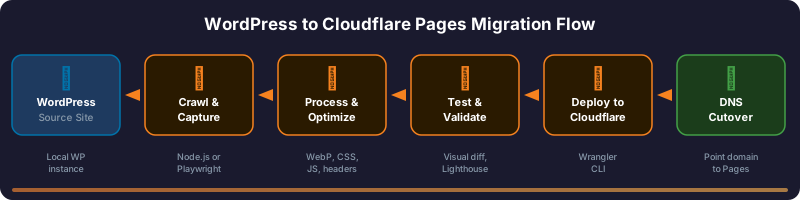
Migration Strategy: Two Approaches
Section titled “Migration Strategy: Two Approaches”There are two fundamentally different ways to capture a WordPress site. Choose based on your site type.
Approach Comparison
Section titled “Approach Comparison”| Factor | A: Crawler-Based | B: Playwright Capture |
|---|---|---|
| Best for | Full WordPress sites (10-200+ pages) | Landing pages, complex layouts (1-5 pages) |
| How it works | Node.js crawler fetches pages via HTTP, parses HTML with Cheerio | Headless Chromium renders pages, captures full DOM |
| CSS/JS fidelity | High - rewrites and optimizes assets | Exact - captures browser-rendered output |
| Forms | Disabled (UI preserved, action set to #) | Functional via Cloudflare Functions + SendGrid |
| Image optimization | Yes - converts JPEG/PNG to WebP via Sharp | No - preserves original assets |
| Performance tuning | Extensive - deferred scripts, async CSS, inlined critical CSS | Minimal - preserves original loading behavior |
| Build time | 2-10 minutes depending on page count | 30-60 seconds per page |
| Dependencies | axios, cheerio, fs-extra, sharp, p-limit | playwright |
| Real-world example | drsmith, clinicsite | riverside (Unbounce landing pages) |
Decision Framework
Section titled “Decision Framework”flowchart TD
A[Is the site a full WordPress installation with 10+ pages?] -->|YES| B[Use Approach A: Crawler-Based]
A -->|NO| C[Is it landing pages or complex visual layouts?]
C -->|YES| D[Use Approach B: Playwright Capture]
C -->|NO| E[Consider a fresh build instead]
Pre-Migration Checklist
Section titled “Pre-Migration Checklist”Complete this before starting either approach.
- Local WordPress instance running (e.g.,
https://sitename.local) - Site loads correctly in browser with no errors
- WordPress admin accessible
- File system access to
wp-content/directory confirmed - Node.js 18+ installed:
node --version - npm installed:
npm --version - Wrangler installed:
npx wrangler --version - Wrangler authenticated:
npx wrangler whoami
- Total page count documented
- Sitemap available at
/sitemaps.xml,/sitemap_index.xml, or/wp-sitemap.xml - All forms identified (Contact Form 7, Gravity Forms, etc.)
- Third-party integrations listed (booking widgets, chat, maps, etc.)
- Custom post types identified
- Media library size estimated
- Current Lighthouse scores captured (mobile + desktop)
- URL structure documented (permalink settings)
- Meta tags verified (title, description, canonical)
- Structured data (Schema.org JSON-LD) identified
- robots.txt downloaded
- XML sitemap downloaded
- Google Search Console access confirmed
- Current indexed page count noted
- Identify installed security plugins:
- CleanTalk (blocks crawlers with 403)
- Wordfence (may rate-limit requests)
- iThemes Security / Solid Security
- Sucuri
- Other
- Plan to temporarily disable during crawl
- Cloudflare account created
- Cloudflare Pages project created (or will create during deploy)
- Custom domain ready (optional - can use
*.pages.devinitially) - SendGrid account and API key ready (if forms need to be functional)
Step-by-Step: Crawler-Based Migration (Approach A)
Section titled “Step-by-Step: Crawler-Based Migration (Approach A)”This is the primary approach for full WordPress sites. It produces a fully optimized static build.
-
Create Project Directory
Terminal window mkdir cloudflare-builder-<sitename>cd cloudflare-builder-<sitename>npm init -y -
Install Dependencies
Terminal window npm install axios cheerio fs-extra p-limit sharpnpm install --save-dev playwright pixelmatch pngjs wranglernpx playwright install chromiumWhat each dependency does:
Package Purpose axiosHTTP client for fetching pages cheerioServer-side HTML parsing and manipulation fs-extraEnhanced file system operations p-limitConcurrency control for image processing sharpImage conversion (JPEG/PNG to WebP) playwrightVisual regression testing (dev only) pixelmatchPixel-level image comparison (dev only) pngjsPNG image processing for visual diffs (dev only) wranglerCloudflare CLI for deployment (dev only) -
Configure the Crawler
Create
crawler.jsin the project root. The key configuration constants are:// Source WordPress site (local development URL)const START_URL = process.env.START_URL || 'https://sitename.local';// Output directory for the static buildconst OUTPUT_DIR = process.env.OUTPUT_DIR || path.join(__dirname, 'sitename-static-build');// Path to local WordPress public directory (for asset syncing)const DEFAULT_WP_PUBLIC_DIR = '/Users/dev/Local Sites/sitename/app/public';// The production domain(s) to strip from URLsconst EXTRA_STRIP_HOSTS = (process.env.EXTRA_STRIP_HOSTS || 'www.sitename.com,sitename.com').split(',').map((host) => host.trim()).filter(Boolean);Environment variables (can override defaults):
Variable Default Purpose START_URLhttps://sitename.localWordPress local URL OUTPUT_DIR./sitename-static-buildStatic build output WP_PUBLIC_DIR(hardcoded path) WordPress public folder EXTRA_STRIP_HOSTSProduction domain(s) Domains to rewrite to relative paths WEBP_QUALITY90WebP conversion quality (0-100) IMAGE_CONCURRENCY4Parallel image conversions DELAYED_SCRIPT_DELAY_MS4000Delay for non-critical JS (ms) CSS_DELAY_MS3500Delay for non-critical CSS (ms) CRAWLER_UAChrome user-agent HTTP User-Agent header -
Configure the Plugin Allowlist
The crawler copies only explicitly approved plugins to avoid bloating the build:
const PLUGIN_ALLOWLIST = new Set(['easy-accordion-free','patient-before-after-gallery-single','taxonomy-images','wp-call-button']);Review your WordPress plugins and add only those whose frontend assets (CSS/JS/images) are needed for the static site to render correctly. Most plugins can be excluded.
-
Run the Crawler
Terminal window npm run build -
Create the Security Headers File
Create
_headersin the project root:/*Cache-Control: public, max-age=3600Strict-Transport-Security: max-age=31536000; includeSubDomains; preloadX-Frame-Options: DENYContent-Security-Policy: frame-ancestors 'none'X-Content-Type-Options: nosniffReferrer-Policy: strict-origin-when-cross-originPermissions-Policy: geolocation=(), microphone=(), camera=(), payment=()/*.htmlCache-Control: public, max-age=3600/wp-content/*Cache-Control: public, max-age=31536000, immutable/wp-includes/*Cache-Control: public, max-age=31536000, immutable -
Create Wrangler Configuration
Create
wrangler.toml:name = "sitename-cf"compatibility_date = "2026-01-25"pages_build_output_dir = "sitename-static-build" -
Set Up npm Scripts
Update
package.json:{"scripts": {"build": "node crawler.js","serve": "python3 -m http.server 4173 -d sitename-static-build","test": "node tests/run-tests.js","test:visual": "node tests/visual-diff.js","cf:login": "wrangler login","cf:deploy": "wrangler pages deploy sitename-static-build --project-name $CF_PAGES_PROJECT"}} -
Run Tests
Terminal window # Validate output files, links, and assetsnpm test# Visual regression comparison (WordPress vs static build)npm run test:visual -
Preview Locally
Terminal window npm run serve# Open http://localhost:4173 in browser -
Deploy
Terminal window # First time: authenticate with Cloudflarenpm run cf:login# DeployCF_PAGES_PROJECT=sitename-cf npm run cf:deploy -
Run Lighthouse Audit
Terminal window npx lighthouse https://your-site.pages.dev/ \--only-categories=performance \--output=json \--output-path=./lighthouse-report.json \--chrome-flags="--headless"Target scores:
- Lighthouse Performance: 90+ mobile, 95+ desktop
- LCP: < 2.5s
- TBT: < 200ms
- CLS: < 0.1
Build Process Details
Section titled “Build Process Details”When npm run build executes, the crawler performs these operations in order:
- Security plugin handling - Automatically renames
security-malware-firewallplugin folder to.disabled, restores after crawl - Sitemap discovery - Checks
sitemaps.xml,sitemap_index.xml, andwp-sitemap.xmlfor page URLs - Page crawling - Fetches each page via HTTP, skipping wp-admin, wp-json, feeds, search results
- HTML transformation (per page):
- Strips analytics scripts (Google Analytics, GTM, Hotjar, Clarity, Facebook Pixel, etc.)
- Removes third-party widgets (UserWay accessibility, reCAPTCHA)
- Removes cookie banners (CookieYes, Cookie Law Info)
- Removes WordPress core scripts (wp-embed, wp-emoji, wp-api, wp-polyfill)
- Removes plugin scripts (Contact Form 7, Perfmatters lazy loader, WPFront Scroll Top, Akismet)
- Rewrites all internal URLs from absolute to root-relative
- Rewrites Perfmatters cache paths (domain-specific to generic
/site/) - Moves jQuery from
/wp-includes/to/assets/vendor/jquery/ - Sets forms to
action="#"andmethod="get"(disables submission) - Adds preconnect hints for critical third-party origins
- Defers external script loading with configurable delay
- Converts non-critical stylesheets to async loading (
media="print"withonload) - Defers non-critical stylesheets with timed loading
- Removes IE conditional comments and HTML comments
- Removes duplicate stylesheets
- Restores Perfmatters lazy-loaded images to native
src/srcset - Adds
loading="lazy"anddecoding="async"to non-hero images - Infers image dimensions from filenames when
width/heightmissing - Removes oEmbed, RSS, REST API, and shortlink
<link>tags - Removes block library CSS
- 404 page generation - Requests a non-existent URL to capture the WordPress 404 template
- Asset syncing from WordPress public directory:
wp-content/uploads/(entire media library)wp-content/themes/(all theme files)wp-content/plugins/<name>/(allowlisted plugins only)wp-content/cache/perfmatters/(minified CSS/JS bundles)wp-includes/js/jquery/(moved toassets/vendor/jquery/)
- Post-processing:
- Prunes non-static files (
.php,.po,.mo,.pot,.md,.scss,.txt) - Strips
@importrules from theme CSS that reference already-linked stylesheets - Downloads remote CSS (e.g., practice framework CSS) to local
assets/vendor/ - Converts all JPEG/PNG images to WebP
- Generates responsive hero images at multiple breakpoints (900w, 1400w, 1920w)
- Rewrites HTML, CSS, and XML files to reference
.webpinstead of.jpg/.png - Injects hero image as
<img>element (replacing CSS background) - Inlines critical CSS into HTML
<style>tags - Prunes unused Perfmatters cache files
- Copies
_headersfile to build output
- Prunes non-static files (
Header Explanation
Section titled “Header Explanation”| Header | Value | Purpose |
|---|---|---|
Cache-Control | public, max-age=3600 | Browser caches HTML for 1 hour |
Cache-Control (assets) | public, max-age=31536000, immutable | Browser caches assets for 1 year |
Strict-Transport-Security | max-age=31536000 | Forces HTTPS for 1 year |
X-Frame-Options | DENY | Prevents site from being embedded in iframes |
Content-Security-Policy | frame-ancestors 'none' | Modern iframe blocking |
X-Content-Type-Options | nosniff | Prevents MIME type sniffing |
Referrer-Policy | strict-origin-when-cross-origin | Controls referrer information |
Permissions-Policy | geolocation=(), ... | Disables unnecessary browser APIs |
Step-by-Step: Playwright Capture (Approach B)
Section titled “Step-by-Step: Playwright Capture (Approach B)”This approach uses a headless browser to capture pages exactly as they render, preserving all CSS, JS, and visual fidelity.
-
Create Project Directory
Terminal window mkdir cloudflare-lp-<sitename>cd cloudflare-lp-<sitename>npm init -y -
Install Dependencies
Terminal window npm install --save-dev playwright wrangler lighthousenpx playwright install chromium -
Create the Download Script
Create
scripts/download-playwright.js:const { chromium } = require('playwright');const fs = require('fs');const path = require('path');const URLS = ['https://example.com/landing-page-1/','https://example.com/landing-page-2/'];const PUBLIC_DIR = 'public';async function downloadPage(url) {console.log(`Downloading: ${url}`);const browser = await chromium.launch({ headless: true });const context = await browser.newContext({userAgent: 'Mozilla/5.0 (Macintosh; Intel Mac OS X 10_15_7) AppleWebKit/537.36'});const page = await context.newPage();// Track network requests for debuggingconst resources = [];page.on('response', async (response) => {resources.push({url: response.url(),type: response.request().resourceType(),status: response.status()});});// Navigate and wait for full renderawait page.goto(url, { waitUntil: 'networkidle', timeout: 60000 });await page.waitForTimeout(3000); // Wait for lazy-loaded content// Determine output path from URLconst urlObj = new URL(url);const pagePath = urlObj.pathname.replace(/\/$/, '') || 'index';const pageDir = path.join(PUBLIC_DIR, pagePath);fs.mkdirSync(pageDir, { recursive: true });// Save rendered HTMLconst html = await page.content();fs.writeFileSync(path.join(pageDir, 'index.html'), html);// Save resource list for debuggingfs.writeFileSync(path.join(pageDir, 'resources.json'),JSON.stringify(resources, null, 2));// Take screenshot for visual referenceconst screenshotDir = path.join('screenshots', pagePath.replace(/^\//, ''));fs.mkdirSync(screenshotDir, { recursive: true });await page.screenshot({path: path.join(screenshotDir, 'capture.png'),fullPage: true});await browser.close();}(async () => {for (const url of URLS) {await downloadPage(url);}console.log('Download complete.');})(); -
Run the Capture
Terminal window node scripts/download-playwright.js -
Post-Process Captured HTML
After capture, the HTML files need manual adjustments:
a. Fix internal links - Replace absolute URLs with root-relative paths:
// In each index.html, find and replace:// https://example.com/page-name/ --> /page-name/b. Add form handlers - Create
form-handler.jsfor each landing page:// public/<page-name>/form-handler.js(function() {'use strict';document.addEventListener('DOMContentLoaded', function() {const forms = document.querySelectorAll('form');forms.forEach(function(form) {form.addEventListener('submit', function(e) {e.preventDefault();const submitButton = form.querySelector('button[type="submit"], input[type="submit"]');const originalText = submitButton? submitButton.textContent || submitButton.value: '';// Show loading stateif (submitButton) {submitButton.disabled = true;if (submitButton.tagName === 'BUTTON') {submitButton.textContent = 'Sending...';} else {submitButton.value = 'Sending...';}}const formData = new FormData(form);formData.append('form_source', 'Page Name - Location');fetch('/api/submit-form', {method: 'POST',body: formData,}).then(function(response) { return response.json(); }).then(function(data) {if (data.success) {var modal = document.getElementById('form-success-modal');modal.style.display = 'flex';modal.querySelector('.form-modal-close').onclick = function() {modal.style.display = 'none';};modal.onclick = function(e) {if (e.target === modal) modal.style.display = 'none';};form.reset();} else {var modal = document.getElementById('form-success-modal');modal.querySelector('h2').textContent = 'Oops!';modal.querySelector('p').textContent =data.message || 'Sorry, there was an error. Please try again.';modal.style.display = 'flex';}}).catch(function(error) {console.error('Form submission error:', error);var modal = document.getElementById('form-success-modal');modal.querySelector('h2').textContent = 'Oops!';modal.querySelector('p').textContent ='Sorry, there was an error. Please try again or call us directly.';modal.style.display = 'flex';}).finally(function() {if (submitButton) {submitButton.disabled = false;if (submitButton.tagName === 'BUTTON') {submitButton.textContent = originalText;} else {submitButton.value = originalText;}}});return false;});});});})();c. Add success modal - Insert into each landing page HTML before
</body>:<div id="form-success-modal" class="form-modal-overlay" style="display:none;"><div class="form-modal-content"><button class="form-modal-close">×</button><h2>Thank You!</h2><p>Your form has been submitted. We will contact you within 24 hours.</p></div></div><style>.form-modal-overlay {position: fixed; inset: 0;background: rgba(0,0,0,0.5);display: flex; align-items: center; justify-content: center;z-index: 99999;}.form-modal-content {background: #fff; padding: 40px; border-radius: 8px;max-width: 500px; width: 90%; text-align: center; position: relative;}.form-modal-close {position: absolute; top: 10px; right: 15px;background: none; border: none; font-size: 24px; cursor: pointer;}</style><script src="form-handler.js"></script> -
Create the Cloudflare Function for Forms
Create
functions/api/submit-form.js:export async function onRequestPost(context) {const { request, env } = context;const SENDGRID_API_KEY = env.SENDGRID_API_KEY;const RECIPIENT_EMAILS = ['admin@example.com'];const FROM_EMAIL = 'noreply@yourdomain.com';const FROM_NAME = 'Website Forms';try {const formData = await request.formData();const name = formData.get('name') || 'Not provided';const email = formData.get('email') || 'Not provided';const phone = formData.get('phone') || formData.get('phone_number') || 'Not provided';const message = formData.get('message') || 'Not provided';const formSource = formData.get('form_source') || 'Unknown';const timestamp = new Date().toLocaleString('en-US', {timeZone: 'America/Los_Angeles',month: 'long', day: 'numeric', year: 'numeric',hour: 'numeric', minute: '2-digit', hour12: true});const isDev = request.url.includes('localhost') || request.url.includes('127.0.0.1');if (isDev) {console.log('DEV MODE - Email would be sent to:', RECIPIENT_EMAILS.join(', '));} else {if (!SENDGRID_API_KEY) throw new Error('Email service not configured');const response = await fetch('https://api.sendgrid.com/v3/mail/send', {method: 'POST',headers: {'Authorization': `Bearer ${SENDGRID_API_KEY}`,'Content-Type': 'application/json',},body: JSON.stringify({personalizations: [{to: RECIPIENT_EMAILS.map(e => ({ email: e })),subject: `New ${formSource} Form Submission`,}],from: { email: FROM_EMAIL, name: FROM_NAME },reply_to: {email: email !== 'Not provided' ? email : FROM_EMAIL,name: name !== 'Not provided' ? name : FROM_NAME,},content: [{ type: 'text/plain', value: `Name: ${name}\nEmail: ${email}\nPhone: ${phone}\nMessage: ${message}\nSubmitted: ${timestamp}` },{ type: 'text/html', value: `<h2>New Form Submission</h2><p><b>Source:</b> ${formSource}</p><p><b>Name:</b> ${name}</p><p><b>Email:</b> <a href="mailto:${email}">${email}</a></p><p><b>Phone:</b> ${phone}</p><p><b>Message:</b> ${message}</p><p style="color:#888;font-size:12px;">Submitted: ${timestamp}</p>` },],}),});if (!response.ok) {const errorText = await response.text();console.error('SendGrid error:', response.status, errorText);throw new Error(`Failed to send email: ${response.status}`);}}return new Response(JSON.stringify({ success: true, message: 'Thank you! We will contact you within 24 hours.' }), {status: 200,headers: { 'Content-Type': 'application/json', 'Access-Control-Allow-Origin': '*' },});} catch (error) {console.error('Form submission error:', error);return new Response(JSON.stringify({ success: false, message: 'Sorry, there was an error. Please try again.' }), {status: 500,headers: { 'Content-Type': 'application/json', 'Access-Control-Allow-Origin': '*' },});}}// CORS preflightexport async function onRequestOptions() {return new Response(null, {status: 204,headers: {'Access-Control-Allow-Origin': '*','Access-Control-Allow-Methods': 'POST, OPTIONS','Access-Control-Allow-Headers': 'Content-Type','Access-Control-Max-Age': '86400',},});} -
Add Security Headers
Create
public/_headers:/*X-Frame-Options: SAMEORIGINX-Content-Type-Options: nosniffReferrer-Policy: strict-origin-when-cross-originCache-Control: public, max-age=3600/<page-name>/images/*Cache-Control: public, max-age=31536000, immutable/<page-name>/styles/*Cache-Control: public, max-age=31536000, immutable/<page-name>/scripts/*Cache-Control: public, max-age=31536000, immutable -
Create Wrangler Configuration and npm Scripts
Create
wrangler.toml:name = "cloudflare-lp-sitename"compatibility_date = "2024-01-01"pages_build_output_dir = "public"Set up npm scripts in
package.json:{"scripts": {"download:playwright": "node scripts/download-playwright.js","serve": "npx wrangler pages dev public","deploy": "npx wrangler pages deploy public","test:visual": "node scripts/visual-test.js","test:deployment": "node scripts/test-deployment.js"}} -
Test Locally
Terminal window # Start local dev server with Functions supportnpm run serve# Opens at http://localhost:8788# Test form submissions (will log to console instead of sending email) -
Deploy and Configure SendGrid
Terminal window # Deploynpm run deployThen set the
SENDGRID_API_KEYenvironment variable in Cloudflare Dashboard:- Go to Pages > Your Project > Settings > Environment Variables
- Add
SENDGRID_API_KEYwith your SendGrid API key - Click “Encrypt” to store it as a secret
- Redeploy for the variable to take effect
Asset Handling
Section titled “Asset Handling”The crawler handles five categories of assets:
| Asset Category | Source | Destination | Processing |
|---|---|---|---|
| Theme files | wp-content/themes/ | Same path in build | CSS rewritten, images converted to WebP |
| Allowlisted plugins | wp-content/plugins/<name>/ | Same path in build | Non-static files pruned |
| Media uploads | wp-content/uploads/ | Same path in build | JPEG/PNG converted to WebP |
| Perfmatters cache | wp-content/cache/perfmatters/<domain>/ | wp-content/cache/perfmatters/site/ | Domain path normalized, unused files pruned |
| jQuery | wp-includes/js/jquery/ | assets/vendor/jquery/ | Path rewritten in all HTML |
Files pruned from the build: .php, .po, .mo, .pot, .md, .scss, .txt
Plugin allowlist: Only plugins whose frontend assets are needed get copied. Example:
const PLUGIN_ALLOWLIST = new Set([ 'easy-accordion-free', 'patient-before-after-gallery-single', 'taxonomy-images', 'wp-call-button']);All other plugins are excluded entirely.
Playwright captures the fully-rendered DOM, which includes all inlined CSS and loaded resources. External assets (images, fonts, third-party scripts) continue to load from their original URLs unless you download and localize them manually.
For landing pages, this is usually acceptable since the page count is small and the priority is visual fidelity over optimization.
External CDN Resources
Section titled “External CDN Resources”Both approaches preserve external CDN references for resources like:
- Google Fonts
- Font Awesome
- Adobe Typekit
- CDN-hosted JavaScript libraries
The crawler adds <link rel="preconnect"> hints for critical origins:
const PRECONNECT_HOSTS = [ 'https://use.typekit.net', 'https://p.typekit.net', 'https://static.example.com', 'https://use.fontawesome.com', 'https://cdnjs.cloudflare.com'];Link Rewriting
Section titled “Link Rewriting”How the Crawler Rewrites Links
Section titled “How the Crawler Rewrites Links”The crawler converts all internal URLs from absolute to root-relative paths. This applies to every attribute that can contain a URL: href, src, action, data-src, poster, srcset, data-srcset, imagesrcset.
Before:
<a href="https://www.drsmith.com/about-plastic-surgery/">About</a><img src="https://drsmithsite.local/wp-content/uploads/2024/photo.jpg"><link rel="stylesheet" href="https://drsmithsite.local/wp-content/themes/drsmith_theme/style.css">After:
<a href="/about-plastic-surgery/">About</a><img src="/wp-content/uploads/2024/photo.webp"><link rel="stylesheet" href="/wp-content/themes/drsmith_theme/style.css">Rules:
- Multiple host variants are stripped (local domain + production domain + www variant)
- Query parameters for tracking (
utm_source,gclid,fbclid, etc.) are removed during URL normalization mailto:,tel:, andjavascript:URLs are preserved as-is- External URLs (different domain) are preserved as-is
- CSS
url()references inside stylesheets and inline styles are also rewritten - Structured data (JSON-LD) URLs are rewritten to root-relative
srcsetvalues are parsed, each URL individually rewritten
CSS URL Rewriting
Section titled “CSS URL Rewriting”CSS files get special treatment. All url() references pointing to the local/production domain are made root-relative:
/* Before */background-image: url(https://drsmithsite.local/wp-content/themes/drsmith_theme/images/bg.jpg);
/* After */background-image: url(/wp-content/themes/drsmith_theme/images/bg.webp);
Additionally, relative CSS URLs are converted to absolute paths to prevent breakage when CSS is inlined:
/* Before (in /wp-content/themes/drsmith_theme/style.css) */background: url(images/icon.png);
/* After */background: url(/wp-content/themes/drsmith_theme/images/icon.webp);
Form Migration
Section titled “Form Migration”The crawler disables all form submissions by setting:
$('form').each((_, el) => { const $el = $(el); $el.attr('action', '#'); $el.attr('method', 'get');});The form UI remains visible and styled, but clicking “Submit” does nothing. This is appropriate for brochure sites where the primary conversion path is phone calls, and forms are secondary.
Contact Form 7 cleanup:
- CF7 scripts and styles are removed
wpcf7inline scripts are removed- reCAPTCHA integration is removed
- Akismet hidden fields are removed
.no-jsclass is replaced with.json form wrappers- Spinner elements are preserved for visual fidelity
For sites where forms must work, the Playwright approach preserves the form HTML and adds a custom submission pipeline:
sequenceDiagram
    participant User
    participant FormHandler as form-handler.js
    participant CF as Cloudflare Function
    participant SG as SendGrid API

    User->>FormHandler: Submits form
    FormHandler->>FormHandler: Prevents default, shows loading
    FormHandler->>CF: POST /api/submit-form
    CF->>CF: Parses form data, formats email
    CF->>SG: Sends via SendGrid API
    SG-->>CF: Success response
    CF-->>FormHandler: JSON response
    FormHandler->>User: Shows success or error modal
SendGrid setup requirements:
- Create SendGrid account (free tier: 100 emails/day)
- Verify sender email (e.g.,
noreply@yourdomain.com) - Create API key with “Mail Send” permission
- Store key as
SENDGRID_API_KEYin Cloudflare Pages environment variables
Development vs. production behavior:
- On
localhost/127.0.0.1: form data is logged to console, no email sent - On production domain: email sent via SendGrid API
SEO Preservation
Section titled “SEO Preservation”URL Structure
Section titled “URL Structure”The crawler preserves WordPress permalink structure exactly:
WordPress: https://example.com/about/ --> /about/index.htmlWordPress: https://example.com/services/botox/ --> /services/botox/index.htmlWordPress: https://example.com/contact/ --> /contact/index.htmlCloudflare Pages serves /about/index.html when a user visits /about/, maintaining URL parity.
Meta Tags
Section titled “Meta Tags”All <meta> tags are preserved from the WordPress HTML, including:
<meta name="description"><meta property="og:title">,og:description,og:image<meta name="twitter:card">,twitter:title, etc.<link rel="canonical">
Structured Data (JSON-LD)
Section titled “Structured Data (JSON-LD)”The crawler preserves and processes structured data:
- Internal URLs in JSON-LD are rewritten to root-relative
- Image URLs in structured data are updated to
.webpextensions - Escaped URLs (
\/) are also handled
Redirects
Section titled “Redirects”Cloudflare Pages supports a _redirects file for URL redirects:
# _redirects/old-page/ /new-page/ 301/blog/ /articles/ 301Create this file in your build output if you need redirects (e.g., if URL structure changed, or to handle trailing slash variations).
robots.txt
Section titled “robots.txt”The crawler fetches robots.txt from WordPress and includes it in the build output. After deployment, update it to reference the new sitemap location:
User-agent: *Allow: /
Sitemap: https://yourdomain.com/sitemaps.xml
XML Sitemap
Section titled “XML Sitemap”The crawler processes XML sitemaps:
- XML stylesheet processing instructions are removed
- Internal URLs are rewritten to root-relative
- Image references are updated to
.webpextensions
After deployment, verify the sitemap is accessible and submit it to Google Search Console.
Common Roadblocks
Section titled “Common Roadblocks”Post-Migration Validation
Section titled “Post-Migration Validation”Automated Test Suite (Approach A)
Section titled “Automated Test Suite (Approach A)”The test suite (tests/run-tests.js) validates:
- Required files exist (
index.html,404.html,robots.txt, theme CSS, logo image) - All critical URLs return 200 status code
- HTML pages contain valid
<html>tags - Local CSS assets referenced in HTML are loadable
- Critical inline CSS is present (if CSS files are inlined)
- No
.localdomain references remain in HTML files (except allowlisted pages) - Perfmatters cache paths are properly rewritten
npm testVisual Regression Testing
Section titled “Visual Regression Testing”The visual diff suite (tests/visual-diff.js) captures screenshots of both the WordPress source and static build, then compares them pixel by pixel:
npm run test:visualConfiguration:
| Variable | Default | Purpose |
|---|---|---|
SOURCE_BASE | https://sitename.local | WordPress source URL |
TARGET_BASE | http://127.0.0.1:4175 | Static build URL |
PIXELMATCH_THRESHOLD | 0.1 | Color distance threshold (0-1) |
MAX_MISMATCH_PERCENT | 1.0 | Maximum allowed pixel mismatch (%) |
VISUAL_WAIT_MS | 5500 | Wait time for assets to load (ms) |
TRIGGER_PERFMATTERS | true | Simulate user interaction to trigger delayed scripts |
VISUAL_HIDE_SELECTORS | (see below) | CSS selectors to hide during comparison |
Hidden elements during visual diff (dynamic content that causes false positives):
[id*="userway"], [class*="userway"], #userway-widget, .uwy,.recaptcha, .g-recaptcha,.cky-consent-container, .cky-overlay, .cky-btn-revisit-wrapper,.cc-window, .cc-bannerOutput:
visual-diff/baseline/- Screenshots from WordPress sourcevisual-diff/candidate/- Screenshots from static buildvisual-diff/diff/- Pixel difference images (only for failures)
Lighthouse Audit
Section titled “Lighthouse Audit”# Mobile performancenpx lighthouse https://your-site.pages.dev/ \ --only-categories=performance \ --output=json \ --output-path=./lighthouse-mobile.json \ --chrome-flags="--headless"
# Desktop performancenpx lighthouse https://your-site.pages.dev/ \ --only-categories=performance \ --preset=desktop \ --output=json \ --output-path=./lighthouse-desktop.json \ --chrome-flags="--headless"Link Checking
Section titled “Link Checking”After deployment, verify all internal links resolve:
# Quick check with curlfor url in / /about/ /contact/ /services/; do STATUS=$(curl -s -o /dev/null -w "%{http_code}" "https://your-site.pages.dev${url}") echo "${url} -> ${STATUS}"doneForm Testing (Approach B)
Section titled “Form Testing (Approach B)”# Test form submission locally (logs to console)npm run serve# Submit form in browser, check terminal output
# Test form on staging domain (sends real email)curl -X POST https://staging.yourdomain.com/api/submit-form \ -F "name=Test User" \ -F "email=test@example.com" \ -F "phone=555-0123" \ -F "message=Test submission" \ -F "form_source=CLI Test"Full Validation Checklist
Section titled “Full Validation Checklist”- All pages load without errors (check browser console)
- Navigation links work across all pages
- Images load correctly (no broken images)
- CSS styles render correctly (compare with WordPress visually)
- JavaScript functionality works (accordions, sliders, menus)
- Mobile responsive layout intact
- 404 page displays for non-existent URLs
-
robots.txtis accessible - XML sitemap is accessible (if included)
- Security headers present (check via browser DevTools > Network)
- No
.localor development URLs in page source - Forms display correctly (UI preserved)
- Forms submit correctly (Approach B only)
- Lighthouse score meets targets (90+ mobile, 95+ desktop)
- Page load time acceptable (< 2.5s LCP)
- No CLS issues (< 0.1)
Migration Commands Reference
Section titled “Migration Commands Reference”| Command | Script | Purpose |
|---|---|---|
npm run build | node crawler.js | Crawl WordPress and generate static build |
npm run serve | python3 -m http.server 4173 -d <output> | Preview static build locally |
npm test | node tests/run-tests.js | Run automated validation tests |
npm run test:visual | node tests/visual-diff.js | Run visual regression comparison |
npm run cf:login | wrangler login | Authenticate with Cloudflare |
npm run cf:deploy | wrangler pages deploy <output> --project-name $CF_PAGES_PROJECT | Deploy to Cloudflare Pages |
| Command | Script | Purpose |
|---|---|---|
npm run download:playwright | node scripts/download-playwright.js | Capture pages via headless browser |
npm run serve | npx wrangler pages dev public | Local dev server with Functions |
npm run deploy | npx wrangler pages deploy public | Deploy to Cloudflare Pages |
npm run test:visual | node scripts/visual-test.js | Visual comparison test |
npm run test:deployment | node scripts/test-deployment.js | Validate deployed site |
npm run cf:configure | node scripts/configure-cloudflare-features.js | Enable Cloudflare features via API |
npm run cf:rollback-rocket-loader | node scripts/rollback-rocket-loader.js | Emergency disable Rocket Loader |
Lighthouse Auditing (Approach B)
Section titled “Lighthouse Auditing (Approach B)”| Command | Purpose |
|---|---|
npm run audit:baseline | Capture baseline Lighthouse scores |
npm run audit:phase1 | Capture post-migration scores |
npm run audit:compare | Compare baseline vs current scores |
Complete Build Flow Summary
Section titled “Complete Build Flow Summary”flowchart TD
A[npm run build] --> B[Disable security plugin]
B --> C[Discover URLs from sitemaps]
C --> D[Crawl each page]
D --> D1[Fetch HTML]
D1 --> D2[Strip analytics, widgets, cookie banners]
D2 --> D3[Remove WP core scripts]
D3 --> D4[Rewrite URLs to root-relative]
D4 --> D5[Defer scripts, async stylesheets]
D5 --> D6[Disable forms]
D6 --> D7[Save to output directory]
D7 --> E[Build 404 page]
E --> F[Sync assets from WP public directory]
F --> G[Prune non-static files]
G --> H[Convert images to WebP]
H --> I[Generate responsive hero images]
I --> J[Rewrite HTML/CSS/XML for WebP]
J --> K[Inline critical CSS]
K --> L[Copy _headers file & restore security plugin]
L --> M[npm test]
M --> N[npm run test:visual]
N --> O[npm run serve]
O --> P[npm run cf:deploy] flowchart TD
A[npm run download:playwright] --> B[Launch headless Chromium]
B --> C[Navigate to each URL]
C --> D[Wait for network idle + lazy content]
D --> E[Save rendered HTML & screenshot]
E --> F[Manual post-processing]
F --> F1[Fix internal links]
F1 --> F2[Add form-handler.js]
F2 --> F3[Add success modal HTML/CSS]
F3 --> F4[Create Cloudflare Function]
F4 --> F5[Add _headers file]
F5 --> G[npm run serve - test locally]
G --> H[npm run test:visual]
H --> I[npm run deploy]
I --> J[Configure SENDGRID_API_KEY]
J --> K[Redeploy]